If you want to sell products on Amazon, Seller Central is where most of the work happens.
It is the platform third-party sellers use to create and manage listings, monitor inventory, process orders, review account performance, manage pricing, access reports, and use many of Amazon’s selling tools.
For a new seller, however, Seller Central can feel complicated. There are different selling plans, fulfillment methods, account settings, fees, dashboards, and policies to understand before you start.
This guide explains what Amazon Seller Central is, how it works in 2026, what it costs, and which parts new sellers should understand first.
Scope note: This guide focuses primarily on selling on Amazon.com in the United States. Fees, eligibility requirements, programs, and Seller Central features can differ across Amazon marketplaces.
What Is Amazon Seller Central?
Amazon Seller Central is the online portal used by third-party sellers to manage their businesses on Amazon.
Amazon describes Seller Central as a digital hub where sellers can manage day-to-day operations such as orders, inventory, sales, promotions, and business performance.
Once you have registered for an Amazon selling account, Seller Central becomes the main interface between your business and Amazon.
Depending on your selling plan and eligibility, you can use Seller Central to:
- Create and update product listings
- Manage product prices
- Track and replenish inventory
- Manage customer orders
- Choose and manage fulfillment methods
- Monitor account health
- Review sales and financial reports
- Run promotions and access optional growth tools
- Communicate with customers
- Manage user permissions
- Access tools for brands and international selling
Amazon has also been adding AI-powered tools to Seller Central. Its current Seller Central experience includes tools designed to assist with listing creation, recommendations, and other seller workflows.
Seller Central vs. Vendor Central
Amazon Seller Central and Vendor Central are not the same thing.
Seller Central is designed primarily for third-party sellers. You sell products through Amazon’s marketplace and generally control your own offers, inventory strategy, pricing, and fulfillment decisions.
Vendor Central is an invitation-only platform for first-party vendors. In that model, a manufacturer or distributor typically sells products wholesale to Amazon, and Amazon then resells those products to customers.
Amazon confirms that Seller Central is open to businesses and entrepreneurs who register as third-party sellers, while Vendor Central requires an invitation from Amazon.
For most people researching how to start selling on Amazon, Seller Central is the platform they need.
How Much Does Amazon Seller Central Cost in 2026?
Amazon currently offers two main selling plans for the US marketplace.
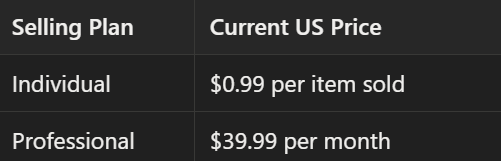
These prices are separate from other selling costs.
Individual Selling Plan
The Individual plan charges $0.99 for each item sold rather than a fixed monthly subscription fee.
It may make sense for sellers with occasional or lower-volume sales, or for those who are still testing whether selling on Amazon is right for them.
Professional Selling Plan
The Professional plan costs $39.99 per month, regardless of how many units you sell.
It is generally intended for sellers who expect regular sales or need a broader range of selling and management tools. However, the features available to a particular seller may depend on the marketplace, category, account status, and eligibility.
The decision should be based on expected sales activity, tool requirements, and total costs rather than a fixed unit threshold.
Other Amazon Selling Fees
The selling plan is only one part of your total cost.
Amazon also charges referral fees when products sell. Referral fees vary by product category, product type, and marketplace.
You may also pay additional fees if you use optional Amazon services.
Examples include:
- Fulfillment by Amazon (FBA)
- Inventory storage
- Amazon Ads
- Certain optional programs and services
For that reason, new sellers should calculate the economics of a product before listing it rather than looking only at the $39.99 Professional subscription.
Amazon provides a Revenue Calculator that can be used to estimate selling and fulfillment costs for different products and fulfillment methods.
Amazon’s fees and policies may change over time, so sellers should confirm current costs before making inventory or fulfillment decisions.
How to Create an Amazon Seller Central Account
Amazon currently organizes seller registration into five main steps.
1. Provide Business Information
Amazon asks for details such as:
- Business location
- Business type
- Business name
- Company registration number, where applicable
- Registered business address
- Phone number
You do not have to form an LLC simply to sell on Amazon.
Amazon states that individuals who are not operating through an incorporated business can select “None, I am an individual” during registration.
2. Provide Seller Information
Amazon then asks for information about the person acting as the primary contact for the business.
This can include:
- Full legal name
- Citizenship
- Country of birth
- Date of birth
- Residential address
- Phone number
Amazon may also ask whether the individual is a beneficial owner, legal representative, or both.
3. Provide Billing and Banking Information
You will need to provide banking and credit-card details.
The bank account used to receive Amazon disbursements generally needs to be held in either your name or your business’s name.
A US bank account is not always required. Amazon states that eligible sellers may use Amazon Currency Converter to receive sales proceeds into supported bank accounts outside the United States.
4. Provide Store and Product Information
Amazon will ask for information about your planned store and products.
This can include:
- Your Amazon store name
- Product codes
- Business certifications
- Manufacturer or brand status
Amazon notes that a seller’s store name must be unique, but it does not have to be identical to the seller’s legal business name.
For many products, you will also need a product identifier such as a UPC, EAN, ISBN, or another GTIN. Some products may qualify for a GTIN exemption.
5. Verify Your Identity
Amazon currently requires sellers to complete identity verification.
Its registration guide says sellers may be asked to upload:
- A government-issued ID
- Proof of residential or business address dated within the previous 180 days
Amazon may then ask you either to take a photo of yourself with your ID or participate in a video call with an Amazon associate.
Registration and verification times can vary. Amazon says registration can often be completed in a few hours, while identity verification usually takes three business days or less, though individual cases can take longer.
What Can You Do Inside Seller Central?
Once your account is approved, Seller Central becomes your operating dashboard.
The current interface organizes tools around several major areas.
Manage Product Listings
One of the most important functions in Seller Central is creating and maintaining product listings.
Amazon currently allows sellers to either:
- Match an offer to a product that already exists in Amazon’s catalog, or
- Create a new product detail page if the product is not already listed.
A typical Amazon product listing includes core elements such as:
- Product title
- Product images
- Bullet points
- Product description
- Price
- Product identifiers and attributes
- Variation information when applicable
Amazon specifically identifies the title, images, description, and bullet points as foundational components of a product listing.
All sellers can add products individually. Professional sellers can also use bulk listing tools, subject to the applicable account and marketplace requirements.
Preparing Listing Content Before You Upload
Creating the listing inside Seller Central is only part of the process.
Sellers still need to prepare accurate product information and visual assets that clearly communicate what they are selling.
For many products, that means preparing product photography, lifestyle imagery, informational graphics, product details, and listing copy before publishing or updating the listing.
BeePOP helps sellers turn product photos and product information into Amazon listing content and sales-ready visual assets, which can then be reviewed and prepared for use in Seller Central.
Sellers should review all generated content carefully to confirm that product claims, specifications, images, and keywords are accurate and comply with Amazon’s applicable policies.
Manage Inventory
Seller Central lets sellers see available inventory, track stock levels, and coordinate fulfillment.
Amazon’s current Seller Central interface includes inventory tools within its supply-chain workspace, with separate options for managing FBA and merchant-fulfilled inventory.
Inventory management becomes increasingly important as sales grow.
Running out of stock can interrupt sales, while holding too much inventory can increase storage and working-capital costs.
Manage Orders
The Orders workspace gives sellers an overview of customer orders, including pending orders.
Depending on the fulfillment method, sellers can also use Seller Central to manage returns, customer claims, shipping activity, and order-related issues.
How much of this work you handle yourself depends heavily on whether you use FBA or FBM.
FBA vs. FBM
Amazon sellers do not all fulfill orders in the same way.
The two most common approaches are Fulfillment by Amazon and Fulfilled by Merchant.
Fulfillment by Amazon (FBA)
With FBA, sellers send inventory to Amazon’s fulfillment network.
Amazon then stores eligible inventory and handles major parts of fulfillment, including picking, packing, shipping, customer service, and returns.
FBA can reduce the operational burden of fulfilling individual customer orders, but it also introduces additional costs such as fulfillment and storage fees.
Not every product is suitable or eligible for FBA, so sellers should review Amazon’s restrictions and calculate costs before deciding.
Fulfilled by Merchant (FBM)
With FBM, the seller retains responsibility for storing inventory and fulfilling customer orders.
Sellers can configure shipping rates, handling times, transit times, and capacity settings within Amazon’s merchant-fulfilled tools.
FBM may make sense when a seller:
- Already has its own warehouse or fulfillment operation
- Wants more control over inventory
- Sells certain bulky, slow-moving, or specialized products
- Has products that are not suitable for FBA
Amazon also allows sellers to combine FBA and FBM rather than using only one fulfillment method across their entire catalog.
Monitor Account Health
Seller Central is not only an operations dashboard. It is also where sellers monitor compliance.
Amazon’s Account Health page includes alerts, notifications, policy information, and performance metrics related to areas such as customer service, shipping performance, and policy compliance.
For merchant-fulfilled sellers in particular, Amazon highlights metrics including:
- Order defects
- Late shipments
- Pre-fulfillment cancellations
- Valid tracking performance
Sellers should check Account Health regularly rather than waiting for a serious warning or enforcement action to appear.
Manage Pricing
Seller Central allows sellers to set and update offer prices.
Depending on the marketplace, selling plan, account status, and eligibility, some sellers may also have access to automated pricing tools.
Pricing decisions should account for more than competitor prices.
A sustainable Amazon price needs to cover:
- Product cost
- Referral fees
- Fulfillment costs
- Storage costs where applicable
- Shipping
- Advertising
- Returns and other operating expenses
- Desired profit margin
A product that generates revenue but produces little or no contribution margin is not necessarily a successful product.
Access Sales and Performance Data
Seller Central provides reports and dashboards for understanding business performance.
Amazon’s current interface includes finance and performance tools for reviewing sales, expenses, inventory, and other operating data.
New sellers should avoid looking only at total sales.
More useful questions include:
- Which products are profitable after Amazon fees?
- Which SKUs are running low on inventory?
- Which products generate returns?
- Are fulfillment expenses rising?
- Are advertising costs consuming too much margin?
- Are listings converting traffic into purchases?
Seller Central becomes more valuable when it is treated as a decision-making system rather than just a place to check today’s sales.
What Is Amazon Brand Registry?
Amazon Brand Registry is separate from simply opening a Seller Central account.
It is a free Amazon program for eligible brand owners that provides additional brand-building and protection tools.
Amazon currently requires an eligible pending or registered trademark for enrollment.
Eligible brands can gain access to tools such as:
- A+ Content
- Brand Stores
- Amazon Vine
- Brand Analytics
- Certain brand protection tools
Amazon also offers Manage Your Experiments for eligible brands, allowing sellers to test elements such as product titles and images.
Brand Registry is therefore particularly relevant for private-label sellers and businesses building their own brands, but it is not a requirement for every seller who wants to open a basic Amazon selling account.
Can You Sell Internationally Through Seller Central?
Yes, but Amazon’s marketplace account structure varies by region.
Amazon currently states that an account created through its US registration process can be used to sell in the United States, Canada, Mexico, and Brazil. Sellers can create additional accounts for other regions and use Amazon Global Selling tools to expand internationally.
International expansion introduces additional considerations, including:
- Local taxes
- Product compliance
- Customs
- Language
- Pricing
- Fulfillment
- Returns
- Marketplace-specific listing requirements
A listing that works in the US should not automatically be copied into another marketplace without reviewing local requirements.
Common Mistakes New Amazon Sellers Make
Seller Central itself is only a tool. Most problems come from decisions made around it.
Ignoring Fees Before Choosing a Product
New sellers sometimes calculate profit using only product cost and selling price.
Amazon fees, FBA expenses, storage, shipping, advertising, returns, and other costs can significantly change unit economics.
Calculate these costs before committing to large inventory orders.
Treating the Listing as a One-Time Task
A product listing should not automatically be considered finished once it is published.
Titles, images, pricing, product information, and other elements may need to change as you learn more about customers and performance.
Neglecting Inventory
A product cannot keep generating sales if it is unavailable.
At the same time, excessive inventory creates its own costs.
Inventory planning is therefore one of the fundamental operating disciplines for an Amazon business.
Ignoring Account Health
Policy compliance is operational infrastructure, not an administrative afterthought.
Monitor account-health notifications and resolve problems early.
Choosing FBA Without Calculating the Economics
FBA can simplify fulfillment, but convenience does not automatically mean profitability.
Use Amazon’s current fee tools and Revenue Calculator before deciding whether FBA makes economic sense for a particular SKU.
Final Thoughts
Amazon Seller Central is the operating system behind most third-party selling activity on Amazon.
It gives sellers the tools to create listings, manage inventory, fulfill orders, monitor performance, maintain account health, manage pricing, and access additional Amazon programs.
For a new seller, the best approach is not to learn every Seller Central feature at once.
Start with the fundamentals:
- Understand your product economics.
- Choose the appropriate selling plan.
- Complete registration accurately.
- Configure your Seller Central account.
- Build accurate, compliant product listings.
- Choose between FBA, FBM, or a combination of both.
- Monitor inventory, profitability, and account health.
Once those foundations are working, the more advanced tools inside Seller Central become much easier to use.
Amazon changes its fees, tools, interfaces, and policies over time, so sellers should always confirm current requirements in Seller Central or Amazon’s official seller documentation before making important business decisions.
FAQ
Is Amazon Seller Central Free?
You can create a selling account under the Individual or Professional model, but selling on Amazon is not generally free.
The Individual plan currently costs $0.99 per item sold, while the Professional plan costs $39.99 per month. Referral fees and other applicable costs are charged separately.
Do You Need an LLC to Open Amazon Seller Central?
No. Amazon explicitly states that sellers do not need to be an LLC or incorporated business. Individuals can register by selecting the appropriate individual business type during registration. Whether forming a legal entity makes sense for tax, liability, or business reasons is a separate legal and financial decision.
What is the difference between Seller Central and Vendor Central?
Seller Central is primarily for third-party marketplace sellers. Vendor Central is an invitation-only system in which vendors generally sell products wholesale to Amazon.
Do You Need a Professional Seller Account to Use FBA?
Amazon’s current pricing page shows that both Individual and Professional selling plans can use FBA.
However, Professional accounts may include additional selling tools that can be useful for businesses operating at greater scale, depending on the seller’s marketplace and eligibility.
Can You Switch Amazon Selling Plans?
Yes. Amazon states that after seller registration, you can switch or cancel your selling plan. That means sellers do not necessarily need to make a permanent decision between Individual and Professional when they first register.
Sources
- Amazon Seller Central overview, account setup, listing management, inventory, orders, account health, pricing, reports, and seller tools.
- Amazon selling plans, referral fees, and other selling costs.
- Amazon seller registration requirements and identity-verification process.
- Fulfillment by Amazon, including storage, order fulfillment, customer service, and returns.
- Fulfilled by Merchant, including seller-managed fulfillment and shipping settings.
- Amazon Brand Registry eligibility and brand-protection tools.
- Amazon Global Selling for expanding to additional Amazon marketplaces.
- Amazon Revenue Calculator for estimating selling fees, fulfillment costs, and potential revenue.