
Once several employees start using ChatGPT for work, individual subscriptions can become difficult to manage. Billing is scattered across personal accounts, there is no shared workspace, and company information may be handled inconsistently from one employee to the next.
ChatGPT Business is designed to solve that problem. It gives teams a self-serve business workspace with centralized billing, member management, access to advanced ChatGPT features, and stronger default protections for company data.
But is it simply ChatGPT Plus for teams? Not quite. Here is what ChatGPT Business costs, what it includes, where Company Knowledge fits in, and how to decide whether it is the right plan for your organization.
What Is ChatGPT Business?
ChatGPT Business is OpenAI’s self-serve ChatGPT plan for teams and organizations. It sits between an individual ChatGPT subscription and the more customizable ChatGPT Enterprise offering.
A company can create a dedicated workspace, invite employees, assign roles, and manage billing from one place. Team members can then use ChatGPT for writing, research, data analysis, coding, document review, and internal knowledge work without relying entirely on separate personal subscriptions.
The plan was previously called ChatGPT Team. OpenAI renamed it ChatGPT Business in August 2025, but the product remained the company’s self-serve team plan.
How Much Does ChatGPT Business Cost?
As of August 5, 2026, OpenAI lists standard ChatGPT Business seats in most supported countries at:
- $25 per user per month with monthly billing
- $20 per user per month with annual billing
- A minimum of two standard seats
That means a two-person team would generally pay $50 per month on the monthly plan or $480 for a full year on the annual plan, before applicable taxes.
Regional pricing, local currency, and taxes may change the final amount shown at checkout.
A standard ChatGPT Business seat includes baseline access to both ChatGPT and Codex. Some advanced features have per-user usage limits. If a member reaches one of those limits, additional eligible usage can draw from an optional pool of credits purchased by the workspace owner; without available credits, that feature may remain unavailable until the limit resets. These workspace credits do not cover OpenAI API usage, which is billed separately through the API platform.
What Does ChatGPT Business Include?
A dedicated team workspace
Instead of asking employees to manage separate work subscriptions, an organization can bring members into one Business workspace. Owners handle billing and role changes, while admins can manage members and routine workspace settings. Owners, admins, and users assigned the Analytics Viewer role can see workspace activity metrics such as active users, messages sent, and credits spent—but those analytics do not provide access to members’ private chat transcripts.
This is especially useful for teams that have already adopted ChatGPT informally and now need a more consistent way to manage access.
Access to advanced ChatGPT tools
Standard ChatGPT Business seats currently include access to features such as GPTs, Projects, Apps, Company Knowledge, ChatGPT Agent, Deep Research, data analysis, and Codex. Availability, rate limits, and administrative controls can vary by feature and workspace configuration.
Depending on the team, those tools can support tasks such as:
- Drafting emails, proposals, reports, and marketing copy
- Reviewing spreadsheets, documents, and business data
- Researching markets, competitors, and customer segments
- Summarizing meeting notes and customer feedback
- Building internal GPTs for repeatable workflows
- Writing, testing, and reviewing code
- Turning company documents into briefs or status updates
ChatGPT Business can serve as a general-purpose workspace for research, drafting, analysis, and internal collaboration, while specialized tools may handle narrower production workflows. E-commerce teams, for example, can pair it with BeePOP's e-commerce content platform to produce and localize product content for multiple markets.
The real advantage is not simply access to more AI features. It is the ability to make those features available inside a managed workspace with shared business controls.
Company Knowledge: Using ChatGPT With Internal Information
Company Knowledge is one of the most practical reasons for a team to consider ChatGPT Business.
Important business context is often spread across cloud storage, internal documents, chat platforms, project tools, and code repositories. Employees may spend more time locating information than acting on it.
With approved workplace apps connected, Company Knowledge allows ChatGPT to search relevant internal sources and use that context when answering a question. Responses can include citations that point employees back to the underlying files or records, making it easier to verify the answer.
The feature can support workflows such as:
Preparing for a customer meeting
A sales representative could pull together recent communications, account notes, support issues, and project updates to create a meeting brief.
Finding patterns in customer feedback
A product team could review feedback stored across multiple sources and identify recurring complaints, feature requests, or emerging risks.
Creating a project status report
A manager could summarize project documentation, open tasks, decisions, and recent discussions into a concise progress update.
Planning a product launch
An engineering or product team could bring together code activity, task status, known issues, and launch documentation to identify unfinished work and potential blockers.
Company Knowledge follows the permissions already attached to the connected services. Connecting an app does not automatically give every employee access to every document. ChatGPT should only retrieve information the individual user is authorized to access.
At the time of writing on August 5, 2026, OpenAI documents Company Knowledge as a ChatGPT Web feature rather than a desktop or mobile app feature. Users must also turn it on for each conversation in which they want to use it. Because product availability can change, teams should verify the current platform requirements before making Company Knowledge a critical workflow dependency.
Does OpenAI Train on ChatGPT Business Data?
OpenAI states that data from ChatGPT Business workspaces is not used to train its models by default.
That is an important distinction for companies handling internal documents, customer information, or proprietary work. It does not, however, eliminate the need for internal data governance.
Organizations should still:
- Review workspace owners and administrator roles regularly
- Remove access promptly when an employee leaves
- Control which workplace apps are connected
- Audit permissions in the original data sources
- Establish rules for confidential and regulated information
- Train employees to verify important AI-generated answers
“Not used for training” is a meaningful protection, but it is not a substitute for sound access control and responsible AI policies.
ChatGPT Plus vs. Business vs. Enterprise
The right plan depends less on how often one person uses ChatGPT and more on how much organizational control the company needs.
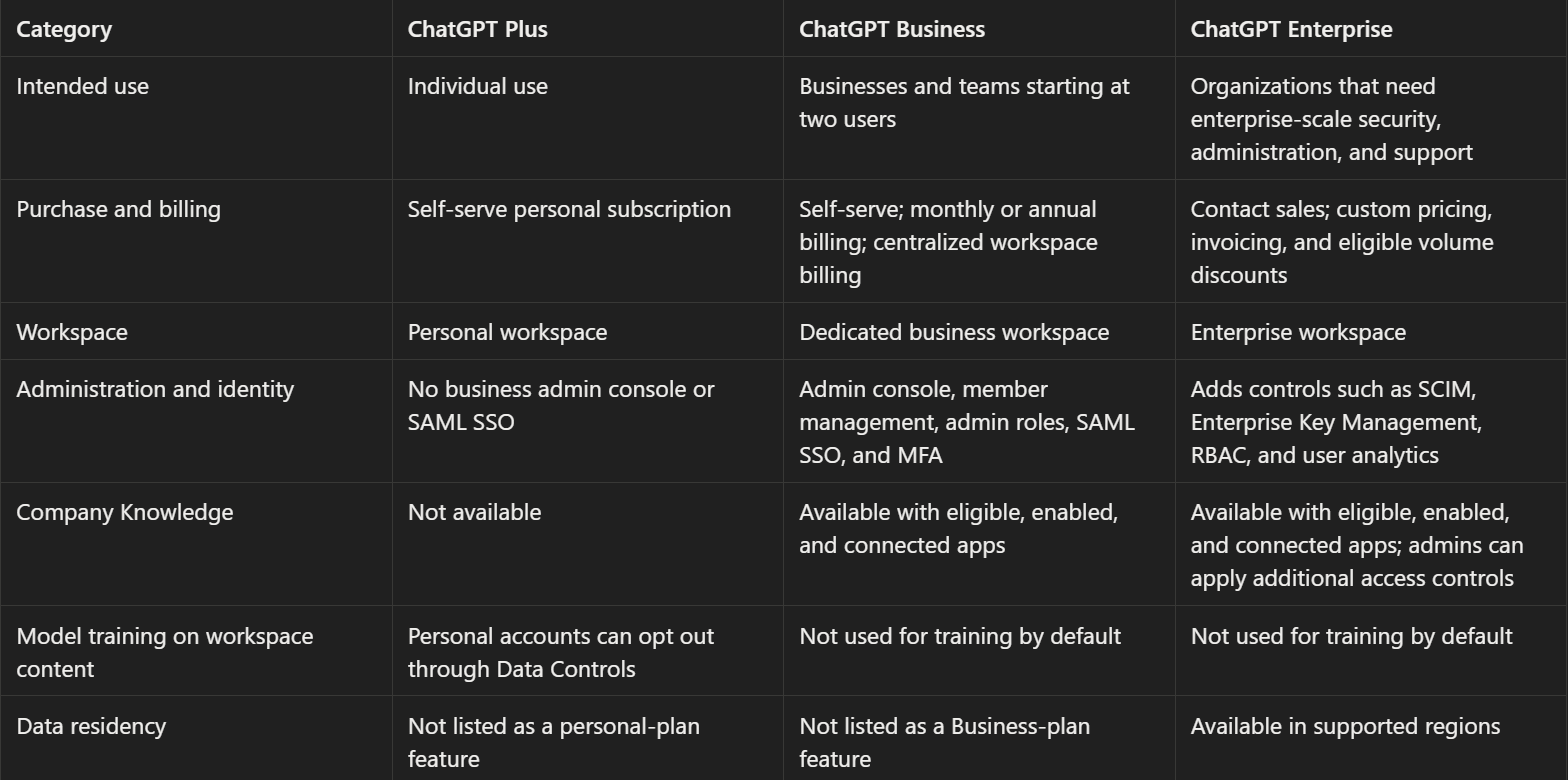
In practical terms, Plus is the individual plan, Business is the self-serve option for teams that need a managed workspace, and Enterprise is the sales-assisted option for organizations that require more advanced identity, security, deployment, or contracting controls.
Should You Merge Your Personal Workspace Into Business?
When someone joins a ChatGPT Business workspace, they may be able to keep their personal workspace separate or merge it into the company workspace.
Keeping the workspaces separate creates a clearer boundary between personal and company activity. The user can switch between them while maintaining separate data and settings.
Merging is a much bigger decision. Personal chats and GPTs may move into the Business workspace, and the personal workspace is then removed. The process is irreversible.
Not every type of data or setting transfers. Custom instructions and certain connected features may not migrate, and ChatGPT Business does not provide the same general data-export option available in some personal contexts. If the employee later loses access to the company workspace, they may also lose access to information that was moved into it.
Before merging, users should:
- Save any important personal information.
- Review which content belongs to them versus the company.
- Read the organization’s retention and access policies.
- Confirm what will and will not transfer.
- Assume the decision cannot be reversed.
For many employees, keeping personal and work activity separate is the safer and cleaner option.
Who Should Use ChatGPT Business?
ChatGPT Business is a strong fit for organizations that:
- Have at least two people using ChatGPT for work
- Want to replace scattered employee subscriptions
- Need centralized billing and basic user administration
- Want employees to work with shared company knowledge
- Prefer business workspace data not to be used for model training by default
- Want to get started without a lengthy enterprise sales process
- Do not yet need the most advanced identity, compliance, or deployment controls
It may be unnecessary for a solo user who only needs an individual AI assistant. In that case, ChatGPT Plus may be sufficient.
It may also be too limited for a large or highly regulated organization that requires SCIM, enterprise key management, advanced role-based access, data residency, IP allowlisting, or customized contractual terms. Those companies should evaluate ChatGPT Enterprise.
FAQ
How many users do you need for ChatGPT Business?
ChatGPT Business generally requires at least two standard seats.
Does a standard ChatGPT Business seat include Codex?
Yes. Standard seats include baseline access to both products. If a user exceeds an eligible Codex limit, additional usage can draw from workspace credits when credits are available. This is separate from legacy Codex-only seats, which are no longer offered to new Business workspaces.
Does ChatGPT Business include OpenAI API credits?
No. ChatGPT subscriptions and OpenAI API usage are billed separately.
Is ChatGPT Business data used to train OpenAI models?
OpenAI says Business workspace data is not used for model training by default.
Can a small business use ChatGPT Business?
Yes. The plan is self-serve and starts at two standard seats, which makes it accessible to small teams as well as larger departments.
Is ChatGPT Business the same as ChatGPT Enterprise?
No. Business is the self-serve team plan. Enterprise adds more advanced security, identity, administration, support, and contracting options for organizations with larger or more complex requirements.
Is ChatGPT Business Worth It?
For a team that already uses ChatGPT regularly, the Business plan is most likely worth it when centralized administration, shared company context, and business data controls solve a real operational problem. It is less compelling for solo or occasional users, while organizations that require controls such as SCIM, advanced RBAC, or data residency should evaluate ChatGPT Enterprise.