
An Amazon keyword tool helps sellers discover the phrases shoppers use to find products. Enter a seed keyword or competitor ASIN, review the results, and identify which terms deserve a place in your listing or PPC campaigns.
The challenge is not collecting hundreds of keywords. It is deciding which terms are relevant, commercially valuable, and realistic to compete for.
This guide explains how to use keyword data to improve product visibility, identify competitor gaps, and build a more focused Amazon SEO and PPC strategy.
Find Amazon Keywords Without Guesswork
Customers do not always search using the exact product name. They may search by feature, material, size, audience, or use case.
For example, a shopper looking for a reusable water bottle might search for:
- Insulated water bottle
- Stainless steel travel bottle
- Leakproof bottle for hiking
- Large gym water bottle
- Water bottle that keeps drinks cold
These searches describe similar products, but each reflects a different customer need.
An Amazon keyword tool helps uncover these variations. Depending on the platform, you may be able to research keywords using:
- A product name
- A category term
- A feature or benefit
- A competitor ASIN
- An existing PPC search term
The goal is not to use every result. The goal is to identify the searches that accurately match the product and show a realistic opportunity for traffic and sales.
How to Use an Amazon Keyword Tool
Step 1: Start with a relevant seed keyword
Choose a phrase that clearly describes the product.
For a portable manual coffee grinder, suitable seed terms might include:
- Coffee grinder
- Manual coffee grinder
- Portable coffee grinder
Avoid terms that are too broad, such as “coffee equipment,” or so specific that they produce very little data.
Step 2: Expand and filter the results
Review related terms and remove anything that does not match the product.
Useful filters include:
- Relevance
- Search demand
- Competition
- Search trend
- Word count
- Organic ranking
- Advertising activity
Third-party metrics are estimates, so use them to compare opportunities rather than treating them as guaranteed traffic numbers.
Step 3: Organize keywords by intent
Group the remaining terms according to what the shopper wants.
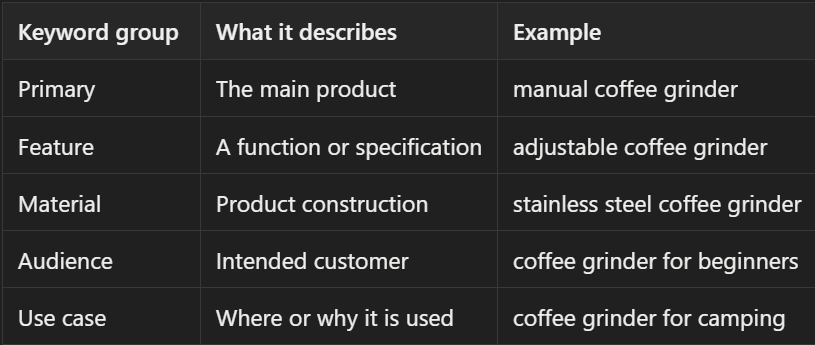
This structure makes it easier to decide which terms belong in the title, bullet points, descriptions, or PPC campaigns.
Which Keyword Metrics Matter Most?
Search volume is only one part of the decision. A useful keyword should be evaluated using several signals.
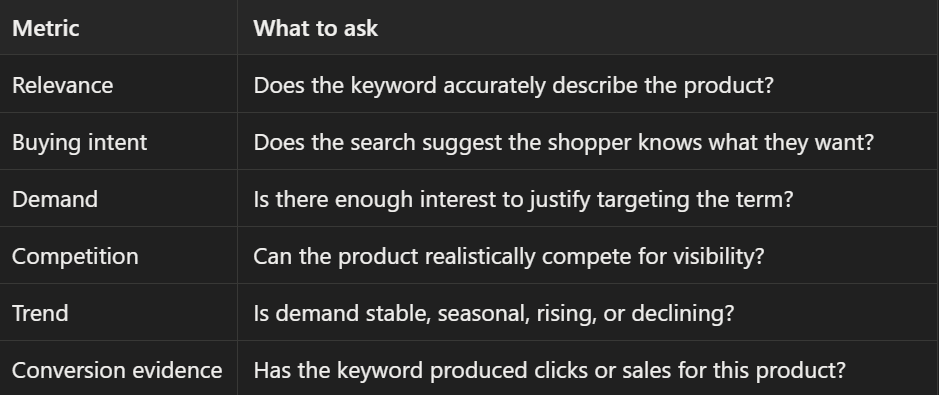
A high-volume keyword may be less valuable than a smaller term with strong relevance and purchase intent.
For example, “coffee accessories” may attract a large audience, but “manual coffee grinder for travel” is more specific and may produce better-qualified traffic.
Five Practical Keyword Research Strategies
1. Build a keyword map from seed terms
Start with several accurate seed terms and expand them into groups covering product type, features, materials, audiences, and use cases.
For a manual coffee grinder, the map might include:
- Product type: manual coffee grinder
- Mechanism: burr coffee grinder
- Feature: adjustable coffee grinder
- Material: ceramic burr grinder
- Use case: travel coffee grinder
- Audience: coffee grinder for beginners
Keep words that appear repeatedly across relevant results, but remove phrases that describe a different product type.
2. Find competitor keyword gaps
Research several competing ASINs instead of relying on a single bestseller.
Compare:
- Products with similar prices
- Products with similar features
- Established category leaders
- Newer products gaining visibility
- Products targeting a similar audience
A keyword gap exists when relevant competitors rank for a term that your listing does not cover.
Before adding it, confirm that the keyword:
- Matches the actual product.
- Describes a feature you can support.
- Reflects a customer need you can satisfy.
- Does not depend on another brand’s trademark.
Competitor research should reveal missing customer language, not encourage inaccurate claims.
3. Identify seasonal and rising demand
Trend data can show whether demand is stable, increasing, or tied to a specific season.
This matters for products related to:
- Holidays
- Travel
- Outdoor activities
- Back-to-school shopping
- Weather
- Fitness
- Gifts
Look for changes across multiple periods instead of reacting to one sudden spike. If demand is seasonal, update the listing and prepare campaigns before the peak arrives.
4. Target high-intent long-tail searches
Long-tail keywords are more specific phrases that often contain a feature, audience, size, or use case.
Compare:
- Desk lamp
- Dimmable desk lamp
- Dimmable desk lamp for small office
The first phrase is broad. The third tells you much more about the shopper’s expectations.
Long-tail terms are worth considering when the product genuinely matches the phrase and the listing can demonstrate the relevant benefit.
5. Use PPC search terms as validation data
Keyword tools provide estimates. PPC reports show how shoppers respond to your actual product.
Review search terms according to their performance:
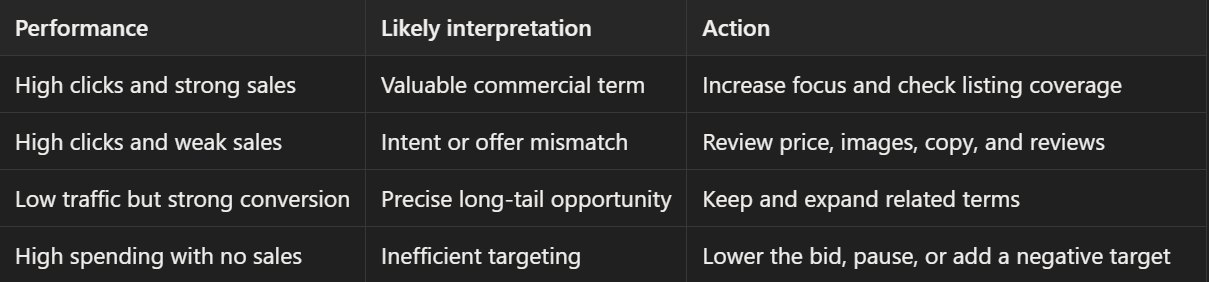
A keyword that repeatedly generates orders may deserve stronger placement in the listing. A keyword that produces clicks without sales should not be kept simply because its search volume is high.
A Practical Keyword Research Example
Suppose a seller is launching a compact manual coffee grinder.
After entering “coffee grinder,” the seller receives hundreds of suggestions.
Remove mismatches
The following terms are excluded:
- Electric coffee grinder
- Commercial coffee grinder
- Automatic coffee machine
- Coffee grinder replacement motor
They may have demand, but they do not accurately describe the product.
Group relevant terms
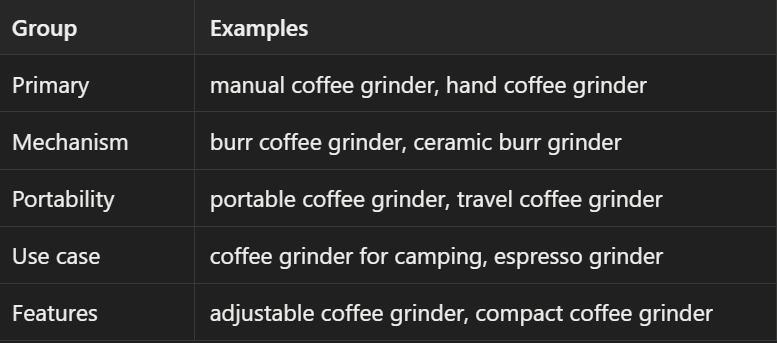
Check competitor gaps
Reverse-ASIN research shows that several competing products rank for:
- Compact manual coffee grinder
- Hand burr grinder
- Portable espresso grinder
These terms are added to the opportunity list because they match the product and appear across multiple relevant competitors.
Validate with PPC
After launching exploratory campaigns, the seller finds that:
- “Manual coffee grinder” attracts traffic but is expensive.
- “Travel coffee grinder” receives fewer clicks but converts well.
- “Coffee grinder for camping” performs better during outdoor season.
- “Commercial coffee grinder” spends money without producing orders.
The seller gives more attention to the travel and camping terms and removes the commercial term from active targeting.
The final strategy is based on relevance, competitor evidence, trend, and conversion data—not search volume alone.
Turn Keywords Into Listing and PPC Actions
Once keywords are prioritized, assign each group a clear role.
Product title
Use the primary product keyword and the most important identifying details. The title should explain what the product is quickly and naturally.
Bullet points
Use feature, material, audience, and use-case terms while explaining real customer benefits.
Product description and A+ Content
Use these sections to answer questions about usage, compatibility, product differences, and ideal customers.
Once the keyword strategy is clear, the next step is turning those insights into listing content shoppers can understand quickly. BeePOP helps Amazon sellers turn a single SKU photo into listing-ready product images and content, making it easier to translate product features, use cases, and selling points into a complete visual listing.
Backend search terms
Use relevant synonyms, abbreviations, and alternative expressions that do not fit naturally into the visible copy. Avoid irrelevant terms, repeated keywords, competitor trademarks, and unsupported claims.
PPC campaigns
Use exploratory campaigns to discover search terms and more controlled campaigns to prioritize proven terms. Keep high-performing keywords separate from broad discovery targets so that budgets and bids are easier to manage.
FAQ
What is an Amazon keyword tool?
An Amazon keyword tool helps sellers discover the search terms customers use to find products. Research may begin with a seed keyword, category term, or competitor ASIN.
Is there a free Amazon keyword tool?
Some tools provide free searches or limited reports. Paid platforms usually offer additional competitor data, filters, trend history, and larger keyword databases.
How accurate is Amazon keyword search volume?
Search volume is an estimate and may vary between tools. Use it to compare opportunities, then validate important keywords with your own PPC, conversion, and sales data.
Can I research keywords using a competitor’s ASIN?
Yes. Reverse-ASIN research can reveal terms associated with competing products. Always confirm that each keyword accurately describes your own product.
How many Amazon keywords should I target?
There is no fixed number. A focused group of highly relevant primary, feature, and use-case keywords is usually more useful than a large list of loosely related terms.