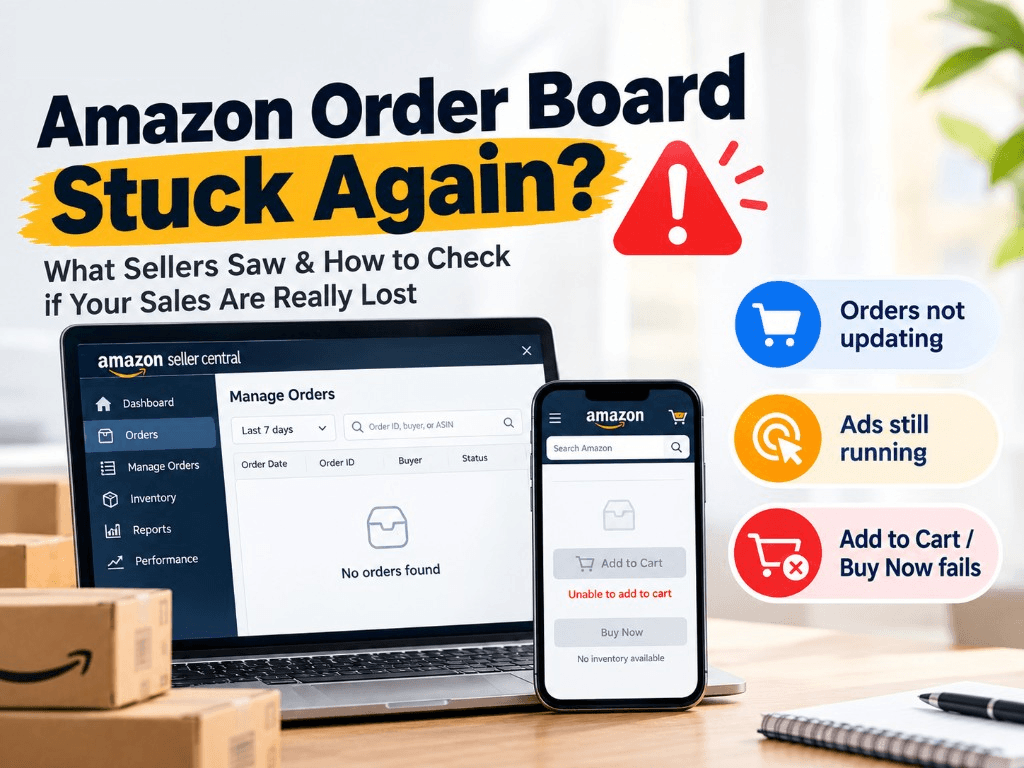
Around 2:00 p.m. EDT (18:00 UTC) on Sunday, September 13, 2026, sellers on Amazon.com and Amazon.ca opened Seller Central and saw the last new order sitting still. Sessions were still coming in. Sponsored campaigns were still spending. The order board was not.
That is 11:00 a.m. PDT the same afternoon, and 2:00 a.m. China Standard Time on Monday, September 14. Some Chinese reports labeled the start as “US West Coast time.” That label does not match their own Beijing conversion. 2:00 a.m. CST on September 14 is 2:00 p.m. Eastern Daylight Time, not Pacific.
The first guess was a reporting delay. That is the usual story, and for some accounts it was the right one. It stopped looking usual when buyer-side tests started failing: Add to Cart would not work, or Buy Now returned “no inventory.”
Amazon had not posted a public incident note in the reporting reviewed for this article. Seller Support, as quoted by sellers, called it a delay and said a technical team was working on it. Until Amazon defines the window, treat this as a seller-reported fault, not an official outage notice.
What sellers actually saw
The symptom cluster was consistent enough that individual “account health” panic faded once people compared notes.
Seller Central froze. Many US and Canada accounts stopped updating after 2:00 p.m. EDT. Some sellers described several hours of zero new orders. CIFNews reported that some order timestamps were stuck around 1:00 a.m. US time. Treat that as a last-visible-order stamp on those accounts, not as the incident start.
The listing often looked fine. Images, price, and inventory still loaded. The break was later in the path. Sellers testing with a buyer account said Add to Cart failed, Buy Now showed no stock, or payment would not complete. Seller Central inventory still looked normal. The buy button did not.
Ads did not freeze. Clicks kept landing. In some accounts, advertised sales briefly looked higher than product sales because the order feed lagged. CIFNews also reported sellers whose usual organic volume, about 30 orders, dropped to zero on the board while every visible order appeared to come from ads. That is a reporting illusion until you run the check in Step 1.
FBA and FBM did not always fail together. Some sellers said FBA order data stopped reporting while FBM still updated. If you judge the whole account from one widget, you will misread the incident.
Public status was muted. Downdetector, as cited in seller-community reports, showed more Amazon problem reports from 2:00 p.m. to 10:00 p.m. EDT, without a full-site spike. That fits a partial checkout or reporting fault, not a black storefront.
This was also not the first Amazon systems scare of 2026. In July, an AWS US-West (Oregon) incident was followed by Seller Central inventory-page errors. September already felt soft for some US sellers. A frozen order board on top of that made the drop look worse than a single Sunday afternoon may justify.
Reported window
ClockWhat was reported
2:00 p.m. EDT, Sunday, Sept 13 (2:00 a.m. CST, Monday, Sept 14)
US and Canada Seller Central order feeds stop updating for many accounts
Same window
Ads keep serving; some FBA feeds stall while some FBM orders still appear
During the freeze
Some listings still load, but Add to Cart fails or Buy Now returns “no inventory”
Through about 10:00 p.m. EDT, Sept 13 (10:00 a.m. CST, Sept 14)
Symptoms still reported, about 8 hours after the start
After that
Some accounts begin to backfill; the middle hours return slower than the edges
Recovery was patchy. Sellers said new orders started to appear again, but a hole stayed in the middle of the window longer than the start or the end. “The board is moving” is not the same as “14:00 to 22:00 EDT is complete.”
Step 1: Read the order emails before you test the cart
A frozen Manage Orders page does not tell you whether sales stopped. Amazon’s order-notification emails often arrive even when the dashboard does not refresh. Amazon Seller Forums already document the same split in general terms: emails in the inbox, or an unshipped count on the home page, and nothing in Manage Orders.
One seller-forum report from this incident made the split obvious. The account showed no new orders for 3 hours, while the inbox received 236 order confirmation emails. The sales happened. The display did not.
Use the inbox as the first filter, not a second network.
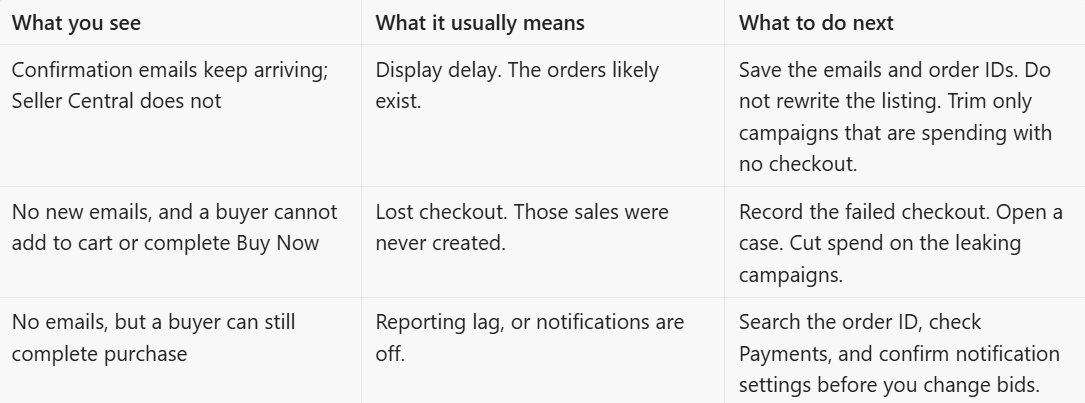
How to run it in five minutes:
- Filter the inbox for Amazon order notifications in the 2:00 p.m. to 10:00 p.m. EDT window. The usual sender is in the
seller-notification@amazon.comfamily. - Count the emails. Pull five to ten order IDs.
- Paste those IDs into Manage Orders. If they resolve, the board is late. If they return nothing, keep the emails. They are your evidence.
- Cross-check Payments and, if you use one, your ERP or ShipStation feed. A third system that received the order is another vote for delay, not lost sales.
- Only then test the storefront.
A second network or a second buyer account is still useful. Use it after the inbox test. That test answers “can a shopper buy,” not “did I already get the sale.” Check Add to Cart, Buy Now, address, and payment on more than one ASIN. If you sell in both the US and Canada, test both.
Do not skip the email step because the listing “looks fine.” In this incident, the product page was the least reliable signal.
Delay is not the same as a lost checkout
Step 1 tells you which side you are on. The rest is what that answer is worth.
If the path still worked and the orders already exist, sales, payments, and inventory movements can backfill after the system catches up. If checkout failed and no order was created, there is nothing sitting in a queue. That traffic is gone. The ad click may still have been billed.
A reporting delay is annoying. A broken checkout while ads run is a cash leak. Some delayed orders started to reappear as accounts recovered. That does not prove every missing hour will fill. Watch 14:00 to 22:00 EDT as a slice, not the Monday daily total.
Why the ad spend hurt more than the missing graph
Amazon Ads charges for eligible clicks, not for completed orders. During a platform fault, that split becomes expensive.
The campaign still pays for the click. The shopper reaches a listing that looks buyable. If cart or checkout fails, conversion drops in a way your bid logic cannot explain. ACOS looks worse. A new-launch campaign loses cheap learning data. A promo-period hole becomes hard to measure. After recovery, you still have to guess whether conversion history, rank, or campaign learning was dented.
That is why “wait and see” is not the same as “leave every campaign on full budget.” You do not need to pause the account. You do need to stop overpaying for a broken last step.
If Step 1 says the orders already exist, cutting every campaign throws away data you are about to get back. If checkout is broken and no order was created, you are paying for a closed door. Those are the campaigns to limit.
Practical split:
- Brand, exact, and harvest campaigns that were already converting: watch first.
- High-click, low-conversion campaigns that kept spending through the freeze: lower budget or bids.
- New-launch campaigns in their learning window: do not rebuild the keyword list on a Sunday fault. Limit spend if checkout is dead, then put them back when the path works.
Do not treat a platform fault like a listing problem
The most expensive mistake in this kind of incident is “fixing” a listing that was not broken.
Hold these while the storefront is unstable:
- Rewriting titles, bullets, main images, or A+ content
- Cutting price or stacking coupons because the board shows zero
- Rebuilding keyword lists after a few hours of dead conversion
- Pausing every campaign at once
- Repeatedly editing inventory, fulfillment, or variation settings
Those edits add new variables. When orders return, you will not know what recovered on its own and what you damaged. If you launched last week or you are in a promo window, that noise is especially costly.
Safer changes are small and reversible: a budget cap, a bid cut, a note in your log with the time in EDT and UTC. Write down what you changed. You will need that when you put spend back.
What to do, in order
1. Inbox first. Run Step 1. That is the delay-versus-lost-sales test.
2. Buyer path second. Test Add to Cart, Buy Now, address, and payment on a buyer account. Use a second network if you want, after Step 1, not instead of it.
3. Save evidence before you touch bids. Export or screenshot campaign spend, clicks, and advertised sales for the outage hours; the order dashboard, sales, and conversion by hour; buyer-side recordings of cart or checkout failure, with the timestamp visible; support case IDs and the exact wording Amazon used; and start and recovery times in EDT and UTC. Keep the Step 1 record with that packet.
4. Cut waste, not the whole account. Reduce budget or bids on campaigns that kept clicking with no path to purchase. Keep core brand and data-gathering campaigns unless they are burning cash with no checkout.
5. Open a case while the event is still fresh. Name the marketplace, ASINs, the 2:00 p.m. to 10:00 p.m. EDT window, the Step 1 result, and whether buyer checkout failed. Ask Amazon to log the incident. You are not promised a credit. You are building a record.
6. Recheck after recovery, then restore spend. Compare the outage hours in Business Reports against a normal Sunday. Check whether FBA and FBM caught up at different speeds. Reconcile advertised sales against actual orders. Watch reserved units for delayed FBA movements. Look at conversion and rank over the next two to three days before you rewrite the listing. Only then put reduced campaigns back.
Platform faults are not in your control. How wide the loss gets usually is.
Can you get the ad spend back?
Maybe. Do not plan on it.
Amazon typically decides credits after it defines the incident window, the affected marketplaces, and whether the clicks were valid. Seller reports from this event did not include a public Amazon statement or a blanket credit.
The case is weaker if Step 1 pointed to delay and the missing hours later backfill. The case is stronger if checkout was broken, no order was created, and the advertising console still shows billed clicks in the same hours.
What makes a later review possible:
- Hourly spend and click logs from 14:00 to 22:00 EDT on September 13
- Conversion and order-count drops in the same hours
- The Step 1 record for that window
- Buyer-side proof that cart or checkout failed
- Case numbers, not just chat screenshots
- A clean start and end time in EDT and UTC
If Amazon later treats the window as a delay only, delayed orders should reappear and the credit case gets weaker. If checkout was broken, the spend case gets stronger. You will not know which one you have until the missing hours either fill in or stay empty.
What to inspect once Seller Central starts moving again
Recovery in this incident was slow and incomplete in the middle. Some sellers saw orders return up to a certain hour, then a hole. Do not assume “new orders are back” means “the outage hours are complete.”
After the board starts updating:
- Compare 14:00 to 22:00 EDT in Business Reports against a normal Sunday of the same type
- Check whether FBA and FBM caught up at different speeds
- Reconcile advertised sales against actual orders
- Watch inventory and reserved units for delayed FBA movements
- Look at conversion and rank over the next two to three days before you rewrite the listing
- Only then put paused or reduced campaigns back to normal
Q4 planning should not swing on one broken Sunday. A frozen order feed in mid-September feels like demand died. It may have been the checkout pipe, the reporting pipe, or both.
FAQ
Did Amazon go down on September 13, 2026?
Seller reports say US and Canada Seller Central order data stalled from about 2:00 p.m. EDT, and some shoppers could not add items to cart or complete Buy Now. Amazon had not published a public incident note in the coverage reviewed for this article.
Why did my ads keep spending if orders stopped?
Ads bill on eligible clicks. If the listing still loads, the click can still be charged even when cart or checkout fails, or when the order exists and Seller Central has not shown it yet.
Will the missing orders come back?
Some delayed orders started to backfill as systems recovered, with the middle hours slower. Orders that never reached checkout will not appear later. Watch the specific hours, not just Monday’s daily total.
Sources
- Order notification emails vs Manage Orders. Amazon Seller Forums document this diagnostic in general terms: sellers receive order emails, or see an unshipped count, while Manage Orders shows nothing. See Is Manage Orders not showing your order history?.
- Earliest detailed seller-community writeups (Chinese). These compiled the US/Canada symptom cluster first. They are not English-language primary sources, and one of them mislabels Eastern time as Pacific: AMZ123, Sept 14, 07:46 CST; AMZ123, 14:00 CST; AMZ123, 15:59 CST; CIFNews / Hugang, 14:19 CST.