ChatGPT Images 2.5 Makes the Creative Process Easier to Refine
OpenAI has introduced ChatGPT Images 2.5 with sharper details, faster generation, more precise editing, and new tools for creating and sharing images.
The main change is not simply that the system can generate another image. It is that the process from the first idea to the finished image is easier to control.
ChatGPT Images 2.5 is designed to preserve reference subjects more reliably, follow focused editing instructions, and maintain earlier changes across a longer conversation. OpenAI also says image-generation latency is up to 50% lower than with Images 2.0.
For creators, marketers, designers, and developers, this can mean fewer restarts when an image is almost right but still needs another revision.
From Reference Image to Final Asset
Preserve the details that matter
ChatGPT Images 2.5 is designed to work more reliably with reference photos. Subjects are more recognizable in new settings, visual styles, and compositions, while lighting and textures appear more natural.
This is useful when the goal is transformation rather than replacement: changing the setting around a person, creating product variations, or exploring a different visual direction while keeping the original subject recognizable.
Edit one element without rebuilding everything
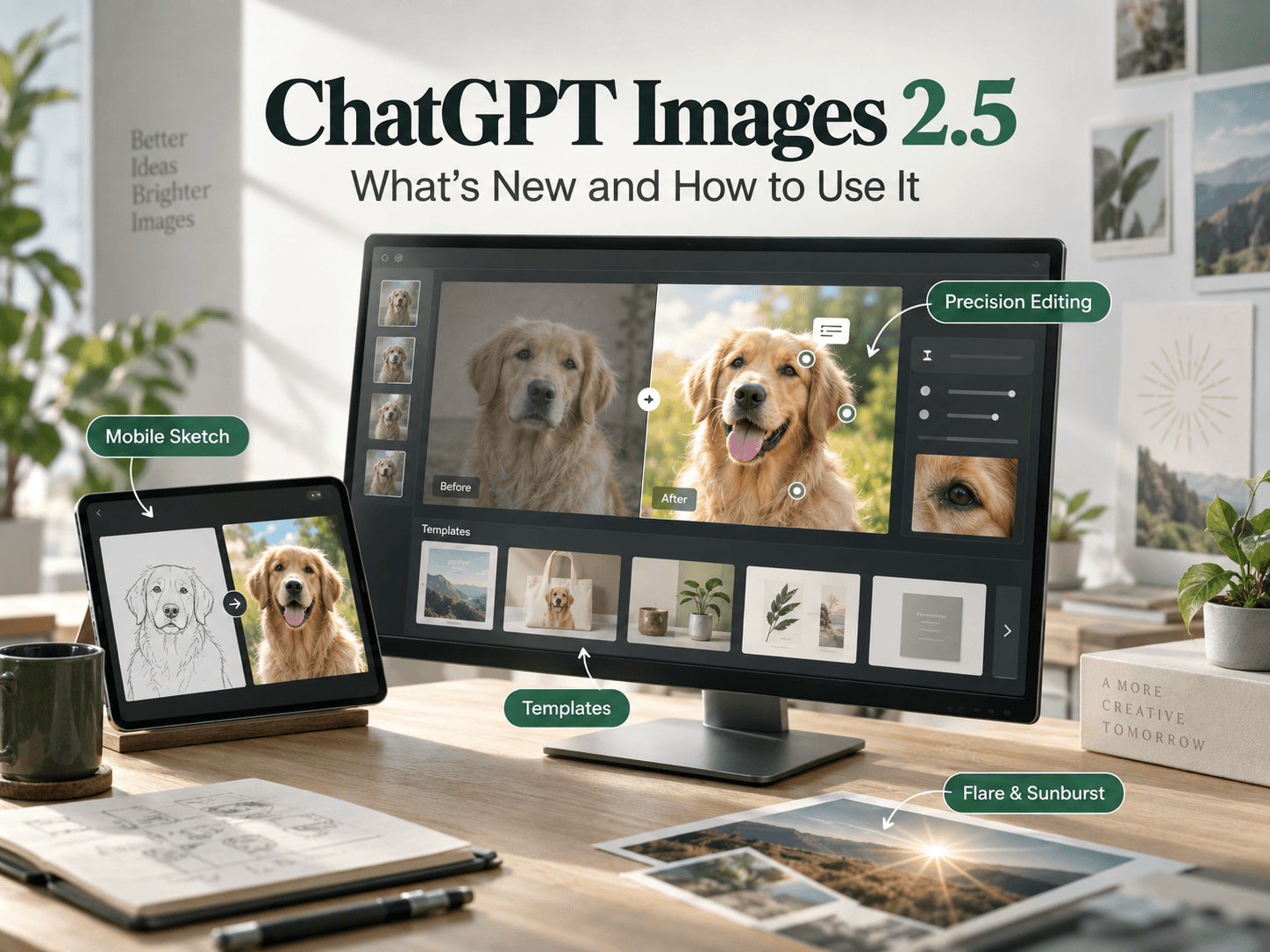
The update also focuses on precision editing. OpenAI describes the ability to change a requested element while keeping surrounding details consistent.
For example, you can update a product, background, or piece of copy while preserving the subject, composition, and surrounding elements. On mobile, users can also open a generated image full-screen and add comments directly to the image, giving ChatGPT more focused guidance on what should change.
That creates a more practical workflow for campaign revisions, product imagery, presentation graphics, and social content than generating a completely new image for every small change.
A useful editing instruction might be:
Replace only the background with a bright summer kitchen. Keep the person’s face, clothing, pose, camera angle, and product placement unchanged.
Keep earlier edits consistent
Long image-editing conversations often create visual drift. A subject may gradually change, a logo may move, or an earlier correction may disappear after a later request.
OpenAI says ChatGPT Images 2.5 follows specific editing instructions more reliably across multiple turns. Earlier changes are more likely to remain consistent, allowing each new revision to build on the work already completed.
This is particularly useful when an image goes through several rounds of creative review before approval.
Better Results from More Complex Briefs
ChatGPT Images 2.5 is designed to interpret complex visual instructions more effectively. OpenAI highlights improvements involving real-world information, complex layouts, transparent backgrounds, and visual styles.
This matters when a brief includes several requirements at once, such as:
- A defined visual hierarchy
- A specific composition
- Brand colors
- A transparent background
- A particular artistic direction
- A fixed position for text or products
The goal is to make detailed creative briefs more dependable, especially for on-brand campaign assets, user-interface concepts, and presentation visuals.
Sketch on Mobile: Turn a Rough Idea into an Image
Sometimes the clearest way to explain an idea is by drawing.
Sketch is a mobile ChatGPT feature that lets you draw directly in ChatGPT and use the rough drawing as a visual guide for the final image. On mobile, you can sketch the layout of a room, the contour of an outfit, or a simple doodle, then add a description of the desired style and other details.
ChatGPT can use the rough art to create a more complete image that is closer to the original idea. On mobile, type “@” in the message box and select Sketch.
The value of Sketch is not artistic polish. A rough drawing can communicate position, shape, and spatial relationships that are difficult to explain with text alone.
Start with a Template Instead of a Blank Canvas
ChatGPT Images 2.5 introduces templates for popular creative formats.
OpenAI’s examples include “Poster” and “Merch.” Users can then add details such as the information to convey, design elements, and styles to personalize the result.
The announcement also mentions formats such as flyers and product photos. These templates give users a starting structure instead of asking them to build an entire prompt from scratch. Templates are not yet available in Work mode.
For example, a user could choose the “Poster” template, add the event information, select a visual style, and describe the desired layout. A brand could use the “Merch” template to explore a shirt or product design with its own graphics and messaging.
Share the Idea, Not Just the Image
When you share an image, you can also choose to include the prompt that produced it.
Other people can then reuse the same idea with their own photos, products, and details. This makes a successful creative direction easier to reproduce across a team or a series of related assets.
For content teams, sharing the prompt can also make the creative process easier to document.
ChatGPT Images 2.5 and the API
The ChatGPT product experience and the API use related but distinct names:
- ChatGPT Images 2.5 refers to the image-generation and editing experience inside ChatGPT.
- GPT-Image-2.5 Flare and GPT-Image-2.5 Sunburst are the two new API models announced for developers.
GPT-Image-2.5 Flare is the default choice for most applications. OpenAI says it brings improvements in quality, editing, and speed to the API, delivering higher-quality images than GPT-Image-2 at 50% lower latency.
Flare is positioned for creator and social content, product experiences, visual search, rapid image prototyping, and high-volume generation.
GPT-Image-2.5 Sunburst is designed for premium visual workflows that benefit from tighter control across edits, including production-ready campaign creative and polished product imagery.
The basic distinction is simple: Flare is designed for speed and scale, while Sunburst is intended for more detailed creative control.
A Simple Prompting Framework
Clear instructions still matter. A useful prompt structure is:
Subject + composition + environment + style + lighting + what to change + what to preserve
For a new image:
Create a clean product photo of a matte black reusable water bottle on a pale stone table. Use a three-quarter angle, soft morning light, and a warm neutral background. Leave negative space on the right for headline text.
For an edit:
Replace only the background with a bright summer kitchen. Keep the person’s face, clothing, pose, camera angle, and product placement unchanged.
The second example works because it defines both the requested change and the elements that must remain stable.
What ChatGPT Images 2.5 Means for Content Teams
The capabilities described by OpenAI suggest a more iterative workflow for content production: create a first concept, make focused changes, preserve approved details, and share the prompt when the result is ready.
This is an inference from the official announcement, not a separate OpenAI claim.
Potential applications include:
- Blog illustrations
- Product-led landing pages
- Social-media graphics
- Campaign variations
- Presentation visuals
- Ecommerce imagery
- Branded editorial content
The SEO fundamentals remain the same. Original written content, clear search intent, descriptive alt text, fast-loading images, internal links, and trustworthy sources are still important for attracting search traffic.
Safety and Availability
OpenAI says ChatGPT Images 2.5 builds on existing safeguards, including checks on prompts and images. OpenAI also continues to use C2PA metadata and invisible watermarking to help identify images created with its tools.
OpenAI says ChatGPT Images 2.5 is rolling out to ChatGPT, ChatGPT Work, and Codex users across all tiers on desktop, mobile, and web.
GPT-Image-2.5 Flare and GPT-Image-2.5 Sunburst are available through the API.
FAQ
What is ChatGPT Images 2.5?
ChatGPT Images 2.5 is OpenAI’s updated image-generation and editing experience for ChatGPT. It focuses on sharper details, faster generation, precise edits, and improved consistency across multiple turns.
Is ChatGPT Images 2.5 faster than Images 2.0?
OpenAI says image-generation latency is up to 50% lower than with Images 2.0. Actual performance can vary depending on the prompt, image complexity, and system conditions.
Is Sketch available on desktop?
Sketch is a mobile ChatGPT feature. It allows users to draw a rough idea directly in ChatGPT and use that drawing as a visual guide for image generation. On mobile, type “@” in the message box and select Sketch.
What is the difference between Flare and Sunburst?
GPT-Image-2.5 Flare is the default API choice for most applications, particularly when speed and scale matter.
GPT-Image-2.5 Sunburst is intended for premium workflows that require tighter control across edits and more detailed creative work.
Can ChatGPT Images 2.5 edit an existing image?
Yes. ChatGPT Images 2.5 is designed to make focused changes while keeping other details, such as the subject, composition, and visual direction, consistent.
Final Takeaway
ChatGPT Images 2.5 is best understood as an improvement to the creative workflow, not simply another AI image generator.
It helps users preserve reference details, make focused edits, maintain consistency across multiple revisions, and start from a mobile sketch or a structured template when a blank prompt is difficult.
For developers, GPT-Image-2.5 Flare and GPT-Image-2.5 Sunburst extend the same direction into applications and production workflows.
The most reliable way to use ChatGPT Images 2.5 is to write a specific brief, separate what should change from what must remain unchanged, and refine the asset through deliberate editing steps.