The best Amazon tools are not necessarily the platforms with the most features. They are the tools that solve your most important business problems without adding unnecessary cost or complexity.
A new seller may need product research and profit calculation. A growing brand may need advertising automation, inventory forecasting, and competitor monitoring.
This guide explains the main types of Amazon seller tools and how to choose the right combination for each stage of your business.
What Are Amazon Tools?
Amazon tools are applications that help sellers research products, optimize listings, manage advertising, monitor inventory, and analyze performance.
They generally fall into three groups:
- Amazon-native tools, available through Seller Central, Amazon Ads, and Brand Registry.
- Market intelligence tools, which estimate demand, keywords, rankings, prices, and competitor performance.
- Management tools, which support inventory, pricing, advertising, profit tracking, and reporting.
Amazon provides tools such as Product Opportunity Explorer, Manage Your Experiments, Automate Pricing, and the FBA Revenue Calculator. Third-party platforms can provide additional research, automation, and competitor data.
An effective tool stack usually combines Amazon’s first-party data with a small number of third-party solutions.
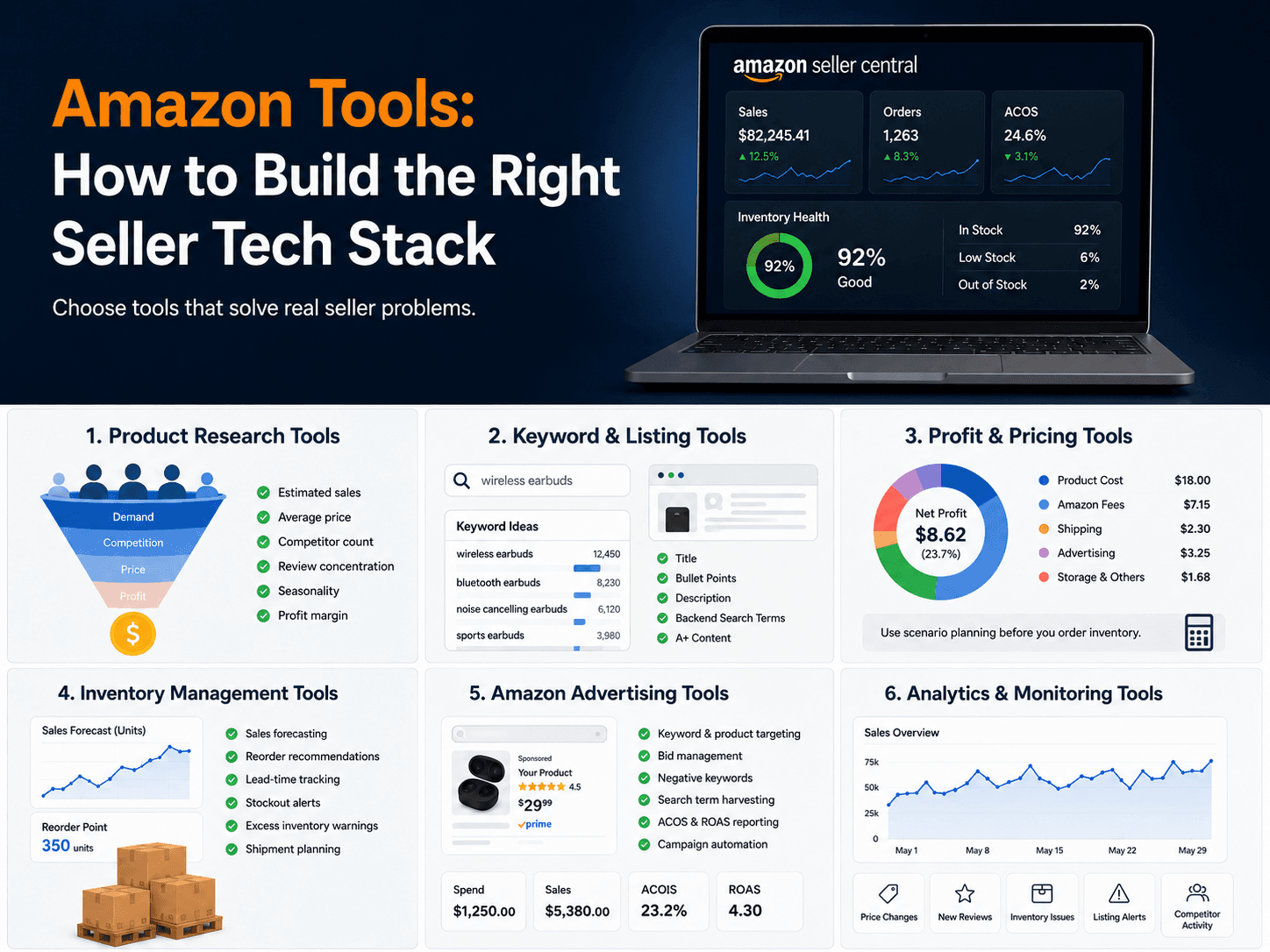
1. Product Research Tools
Product research tools help sellers evaluate demand, competition, pricing, and market potential.
Important metrics include:
- Estimated sales
- Average selling price
- Number of competitors
- Review concentration
- Sales trends and seasonality
- Brand concentration
- Listing quality
- Opportunities for differentiation
Amazon Product Opportunity Explorer organizes products and search terms into customer-need niches. It provides information about searches, purchases, pricing, reviews, returns, and competition.
Third-party platforms such as Helium 10 and Jungle Scout can add competitor estimates, historical trends, and more flexible research filters.
Product research can identify an attractive market, but a separate cost analysis is still required to determine whether the opportunity is financially viable.
2. Keyword and Listing Tools
Amazon keyword tools help sellers understand what customers search for.
They can be used to:
- Discover relevant keywords
- Analyze competitor ASINs
- Find long-tail search terms
- Estimate search demand
- Track organic rankings
- Identify PPC targets
After collecting keywords, listing optimization tools help place them naturally within product titles, bullet points, descriptions, and backend search terms.
A strong listing must balance search visibility with customer communication. It should explain the product’s benefits, specifications, compatibility, use cases, and differentiating features without unnatural keyword repetition.
Listing optimization also extends to visual content. Sellers may need main images, lifestyle images, feature graphics, comparison charts, size visuals, and A+ Content assets to communicate product information quickly. Tools such as BeePOP can help sellers transform product photos into listing-ready visuals without relying on a traditional design workflow.
Brands enrolled in Amazon Brand Registry can use Brand Analytics to access search and customer behavior reports. Search Query Performance, for example, shows a brand’s share of impressions, clicks, cart additions, and purchases for specific queries.
Eligible brands can also use Manage Your Experiments to test different titles, images, bullet points, descriptions, and A+ Content.
3. Profit and Pricing Tools
Revenue does not tell sellers whether a product is profitable.
A complete calculation should include:
- Product and packaging costs
- Freight and customs
- Amazon fees
- Storage
- Advertising
- Returns
- Discounts
- Software expenses
Amazon’s Revenue Calculator can estimate and compare costs for FBA and seller-fulfilled products.
Before ordering inventory, sellers should calculate several scenarios, including lower selling prices, higher advertising costs, and increased freight expenses.
Pricing tools can then help manage live products. Amazon’s Automate Pricing feature allows sellers to create pricing rules while setting minimum and maximum limits.
Automated repricing should always protect a minimum acceptable margin. Reacting to competitors without clear price limits can create an unprofitable race to the bottom.
4. Inventory Management Tools
Inventory tools help sellers determine when and how much to reorder.
Common features include:
- Sales forecasting
- Reorder recommendations
- Lead-time tracking
- Stockout alerts
- Excess-inventory warnings
- Shipment planning
- Purchase-order management
A basic reorder calculation considers average daily sales, production time, freight, customs, Amazon receiving time, and safety stock.
Inventory software becomes particularly useful when a business manages multiple products, suppliers, warehouses, or marketplaces. It can reduce both stockouts and excess storage costs.
5. Amazon Advertising Tools
Amazon PPC tools help sellers create and optimize advertising campaigns.
They may provide:
- Keyword and product targeting
- Bid management
- Negative keyword recommendations
- Search-term harvesting
- Budget controls
- Campaign automation
- ACOS and ROAS reporting
Sponsored Products are cost-per-click ads that can appear in search results and on product pages. Sellers control their targets, bids, and daily budgets.
Before using automation, sellers should define the purpose of each campaign. A product-launch campaign may accept higher costs than a mature campaign focused on profit.
Advertising performance must also be evaluated against product margins. The same ACOS can be profitable for one product and unsustainable for another.
6. Analytics and Monitoring Tools
Analytics tools combine sales, advertising, inventory, fees, and competitor information into reports.
Useful metrics include:
- Net profit
- Conversion rate
- Refund rate
- Advertising spend
- ACOS and total ACOS
- Inventory value
- Organic rankings
- Market share
Monitoring tools can also alert sellers to suppressed listings, price changes, lost Featured Offers, inventory problems, new reviews, and competitor activity.
The goal is not to track every available metric. Each report should help answer a specific question or support a business decision.
Amazon-Native vs. Third-Party Tools
Amazon-native and third-party tools serve different purposes.
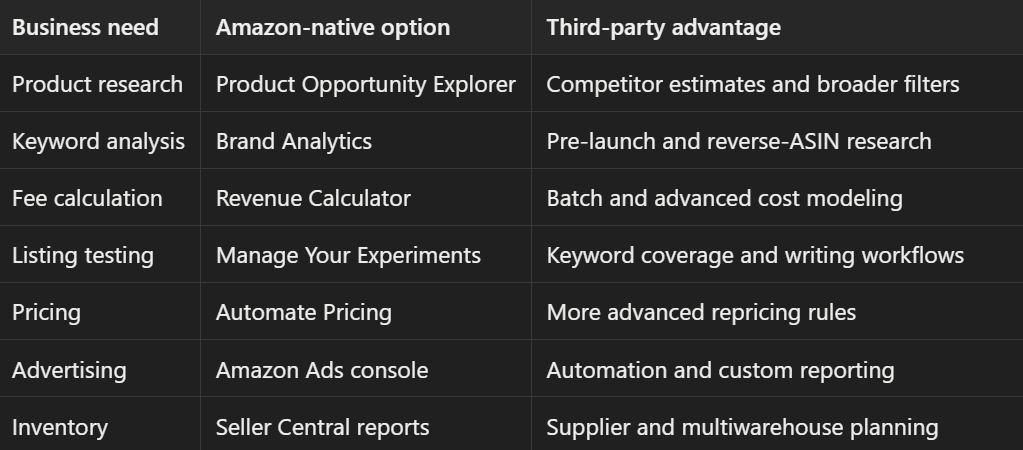
Amazon-native tools provide direct marketplace data. Third-party software is most valuable when it saves time, combines information, or provides capabilities unavailable in Seller Central.
Choosing Tools for Each Business Stage
Before Launch
Focus on:
- Product research
- Keyword research
- Competitor analysis
- Fee and profit calculation
- Intellectual property checks
The goal is to reject weak ideas before purchasing inventory.
During Launch
Add:
- Listing optimization
- Keyword tracking
- PPC management
- Sales monitoring
- Inventory alerts
At this stage, determine whether customers can find the product and whether the listing converts.
During Growth
Consider:
- Inventory forecasting
- Profit dashboards
- Advertising automation
- Competitor monitoring
- Multimarketplace reporting
Add software only when manual processes become unreliable or too time-consuming.
How to Choose the Right Amazon Tools
Before subscribing, consider six factors:
- Business need: Identify the specific problem the tool must solve.
- Data source: Understand whether figures come from Amazon, your seller account, or estimates.
- Marketplace support: Confirm that your target countries are covered.
- Integration: Check compatibility with Seller Central, Amazon Ads, accounting, and inventory systems.
- Usability: Choose tools your team will actually use.
- Return on cost: The software should save time, reduce errors, or improve measurable results.
Avoid paying for several platforms with overlapping features. Third-party estimates should also be validated with actual Seller Central data whenever possible.
FAQ
What Amazon tools should beginners use?
Most beginners need product research, keyword research, fee calculation, listing optimization, and basic PPC analysis.
Are free Amazon tools enough?
They may be sufficient for initial research and a small catalog. Paid tools become more useful when sellers need historical data, competitor estimates, automation, or advanced reporting.
How many tools does an Amazon seller need?
Use the smallest number that covers your workflow. Each additional subscription should solve a separate problem and produce measurable value.
Build a Minimum Viable Tool Stack
Most sellers can begin with four capabilities:
- A product and keyword research tool
- A fee and profit calculator
- A listing and search analytics tool
- An advertising and financial dashboard
Inventory forecasting can be added as the catalog grows. Automation becomes useful when the number of products or campaigns makes manual management inefficient.
The right Amazon tools stack is not the one with the longest feature list. It is the smallest system that provides reliable answers, improves daily decisions, and grows with the complexity of your business.
Sources
- Amazon Product Opportunity Explorer — product demand, competition, pricing, reviews, returns, and search insights.
- Amazon Brand Analytics — Search Query Performance and customer behavior dashboards.
- Amazon Manage Your Experiments — testing titles, images, bullet points, descriptions, and A+ Content.
- Amazon Revenue Calculator — estimating FBA and seller-fulfilled fees, costs, and revenue.
- Amazon Automate Pricing — automated pricing rules and price limits.
- Amazon Sponsored Products — CPC advertising, targeting, bids, budgets, and placements.